Shop Floor Control Software: What High-Performing Plants Do Differently
What is Shop Floor Control Software in Manufacturing?
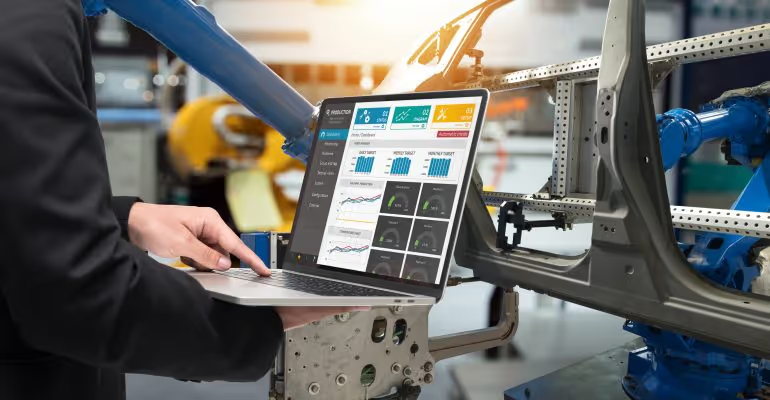
Shop floor control (SFC) software is a manufacturing execution system (MES) module or standalone application that monitors, tracks, and manages the entire production process on a factory's shop floor in real-time. It acts as a bridge between the high-level planning of an ERP (Enterprise Resource Planning) system and the actual physical production activities.
The primary goal of SFC is to provide managers and operators with real-time visibility into production status, resource utilization, and potential issues, enabling them to make quick, data-driven decisions to optimize output.
Top Shop Floor Control Software Solutions for Manufacturing Execution Systems for Real-time Shop Floor Visibility
- DELMIAWorks
- Comprehensive Manufacturing Execution System (MES) with real-time visibility into the production process.
- Key Features: Identifies and resolves bottlenecks, manages inventory, and provides production reporting.
- Best For: Businesses needing a deeply integrated system for end-to-end manufacturing management.
- Katana MRP
- User-friendly platform designed for small to mid-sized manufacturers.
- Key Features: Simplifies inventory management and production planning with custom API integrations for e-commerce and accounting systems.
- Best For: Businesses seeking seamless integration with business systems and ease of use.
- MachineMetrics
- Description: Focuses on equipment data collection and analytics using edge devices.
- Key Features: Automatically gathers data on part counts, downtime, and more to improve Overall Equipment Effectiveness (OEE) and maintenance.
- Best For: Companies prioritizing data-driven insights for equipment performance.
- Plex Systems
- Description: Cloud-based ERP and MES solution offering a unified manufacturing platform.
- Key Features: Extensive production monitoring, quality management, and traceability features.
- Best For: Companies needing a scalable, all-in-one solution for integrated business operations.
Technologies for Task Sequencing on Factory Floor
Task sequencing on the factory floor in 2025 is driven by the integration of Industry 4.0 and Industry 5.0 technologies, shifting from static planning to real-time, AI-driven dynamic orchestration.
1. Advanced Software Platforms
Modern factory floors use integrated software ecosystems to manage the flow from order to execution:
- APS (Advanced Planning and Scheduling): The primary tool for sequencing, using algorithms to balance production efficiency with delivery deadlines.
- MES (Manufacturing Execution Systems): Acts as the real-time "bridge" between high-level plans and the shop floor, tracking WIP (Work-in-Process) and monitoring machine/worker performance.
- ERP (Enterprise Resource Planning): Provides the foundational data for sequencing, including bills of materials, routing, and labor availability.
2. AI and Optimization Algorithms
AI has moved from experimental to standard use for solving complex sequencing problems:
- Deep Reinforcement Learning (DRL): Used for "Co-RTSATP" (Co-optimization of Robotic Task Sequencing and Trajectory Planning). It simultaneously optimizes the order of tasks and the actual physical path a robot takes to minimize energy and time.
- Genetic Algorithms (GA): A common metaheuristic used to solve "Multi-Robot Flexible Job Shop" (MRFJS) problems, where multiple robots with different capabilities must be sequenced across various parallel machines.
- LSJ Model (Launch Sequence of Jobs): An advanced method that integrates customer priority, product complexity, and resource availability to determine the exact order of job initiation.
- Heuristic Rules: Traditional but still widely used rules include EDD (Earliest Due Date), SPT (Shortest Processing Time), and CR (Critical Ratio).
3. Real-Time Tracking and Monitoring
Technologies that provide the "live" data required for dynamic rescheduling:
- Digital Twins: Real-time virtual renderings of the factory floor that run thousands of "what-if" simulations to identify bottlenecks and test the impact of new sequences before implementation.
- IIoT (Industrial Internet of Things): Sensors (temperature, vibration, pressure) feed real-time status into sequencing engines, allowing for immediate adjustments if a machine fails.
- RFID and RTLS: Used for precise tracking of materials and parts (e.g., paper rolls or metal parts) through multi-step production processes to ensure they remain in the correct sequence.
4. Human-Machine Collaboration (Industry 5.0)
- Cobots (Collaborative Robots): Modern cobots utilize computer vision and AI to adapt their task sequence based on the real-time movement and safety of human coworkers.
- AR (Augmented Reality): AR glasses provide workers with step-by-step visual cues and sequence instructions overlaid on their physical workspace, reducing human error in manual assembly.
5. Task Orchestration Tools
- AI Task Orchestrators: Specialized tools that match specific employee skills with required project tasks, automating the generation of detailed task lists and schedules.
- Digital Task Managers: Centralized tools (e.g., Tervene) that standardize how non-compliance issues or maintenance tasks are inserted into the daily production sequence.
What Platforms Improve Shop Floor Technician Workflows?
In 2026, platforms improving shop floor technician workflows focus on real-time data integration, AI-driven guidance, and the elimination of paper-based manual tasks.
These solutions are broadly categorized into Connected Worker Platforms, Mobile Maintenance (CMMS), and Digital Work Instruction tools.
1. Connected Worker Platforms (CWP)
These platforms serve as a digital hub, linking technicians with machines, enterprise systems (ERP/MES), and remote experts.
- Tulip: A leading no-code platform that allows manufacturers to build custom apps for guiding operators and collecting real-time machine data.
- Augmentir: An AI-powered platform that identifies technician skill gaps in real-time and provides personalized, automated guidance to close them.
- Parsable: Digitizes standard operating procedures (SOPs) and checklists to ensure high-quality execution and 100% digital traceability.
- Poka: Focuses heavily on knowledge sharing and on-the-job training through video-based learning and multi-location standardization.
2. Mobile Maintenance and CMMS
Specialized platforms designed specifically for maintenance technicians to manage repairs and preventive maintenance on the move.
- MaintainX: Highly rated for its mobile-first design and integrated real-time chat, allowing technicians to collaborate directly within a work order.
- Limble CMMS: Renowned for its simplicity and quick setup, featuring QR code asset management where technicians scan a code to instantly access full equipment history.
- UpKeep: A data-focused solution that offers advanced analytics and meter-based tracking to trigger maintenance based on actual machine usage.
3. Digital Work Instruction & SOP Tools
These platforms replace paper manuals with interactive, visual guides that reduce errors and onboarding time.
- Epicor Connected Process Control: Configures digital instructions that automatically react to product variations, ensuring technicians only see instructions relevant to the specific part at their station.
- VKS (Visual Knowledge Share): Uses images and videos to provide step-by-step visual guidance, reported to reduce defects by up to 95%.
- Dozuki: A popular tool for standardizing complex procedures and capturing "tribal knowledge" from senior technicians before they retire.
4. Shop Floor Control & Real-Time Intelligence
- MachineMetrics: Provides real-time machine data to technicians, alerting them instantly to bottlenecks or performance drops before they become critical failures.
- Microsoft Connected Worker: Leverages the 365 ecosystem, including Teams and Copilot, to provide AI-powered assistance and contextual support directly within existing workflows.
Key Features of Shop Floor Control Software
Shop floor control (SFC) software is a critical component of modern manufacturing, providing a digital backbone for managing and optimizing production operations. It acts as a bridge between the enterprise resource planning (ERP) system and the physical manufacturing processes, offering real-time visibility and control over the production floor.
By leveraging SFC software, manufacturers can make data-driven decisions to improve efficiency, reduce costs, and enhance overall productivity.
Key Features of Shop Floor Control Software
- Real-time Production Tracking: This feature provides an up-to-the-minute view of all activities on the shop floor. It allows managers to track the status of work orders, monitor material flow, and see the exact progress of each product as it moves through the production line. By having this real-time data, companies can identify bottlenecks, anticipate delays, and adjust schedules proactively to keep production on track. This visibility is essential for ensuring on-time delivery and meeting customer demands.
- Labor and Workforce Management: SFC software simplifies the complex task of managing the manufacturing workforce. It enables supervisors to assign specific tasks to individual operators or teams, track labor hours, and monitor employee productivity. The system can also help in managing skills matrices, ensuring that the right person is assigned to the right job based on their qualifications. This helps in optimizing labor costs and improving overall workforce efficiency.
- Machine Monitoring and Downtime Tracking: A key function of SFC software is to collect data directly from machines and equipment on the shop floor. It monitors machine status, performance, and utilization in real time. The software can automatically detect and log machine downtime, providing detailed information about the cause of the stoppage. This allows maintenance teams to quickly identify and address issues, minimize unplanned downtime, and schedule predictive maintenance to prevent future failures.
- Quality Assurance and Compliance: SFC software plays a vital role in maintaining high-quality standards and ensuring regulatory compliance. It enables the collection of quality data at various stages of production, allowing for immediate identification of defects or deviations. The software can enforce quality checks, ensuring that products meet specific criteria before moving to the next stage. It also maintains a detailed digital record of the production process, which is crucial for traceability and demonstrating compliance during audits.
How Shop Floor Control Software Works
Shop Floor Control (SFC) software provides a digital bridge between the manufacturing plant and the business's management systems. It's designed to track and manage all activities on the production floor in real time, from the moment raw materials enter the facility to when finished goods are dispatched.
By digitizing these processes, SFC software helps manufacturers increase efficiency, reduce waste, and improve overall operational visibility.
Integration with ERP/MES
- Seamless Data Flow: SFC systems are designed to integrate directly with higher-level business software like Enterprise Resource Planning (ERP) and Manufacturing Execution Systems (MES). This integration ensures a seamless, two-way flow of data, allowing production schedules from the ERP to be sent down to the shop floor and real-time production data to be sent back up.
- Centralized Control: This connectivity creates a centralized system of record. When a machine completes a task or an operator logs an event, that data is instantly available to managers and planners in the ERP, eliminating the need for manual data entry and reducing the chance of errors.
Real-time Dashboards and Analytics
- Instant Visibility: SFC software provides production managers with real-time dashboards that offer an up-to-the-minute view of everything happening on the shop floor. These dashboards display critical metrics like machine status, production output, and work order progress.
- Actionable Insights: By analyzing the data collected from the shop floor, the software generates reports and analytics. These insights help identify bottlenecks, track key performance indicators (KPIs) like Overall Equipment Effectiveness (OEE), and provide the information needed to make proactive decisions to improve productivity.
Best Practices for Implementing Shop Floor Control Software
Implementing Shop Floor Control (SFC) software is a critical step for modern manufacturers aiming to optimize operations, improve efficiency, and gain real-time visibility into production. By digitizing and automating tasks on the factory floor, SFC systems help bridge the gap between planning and execution.
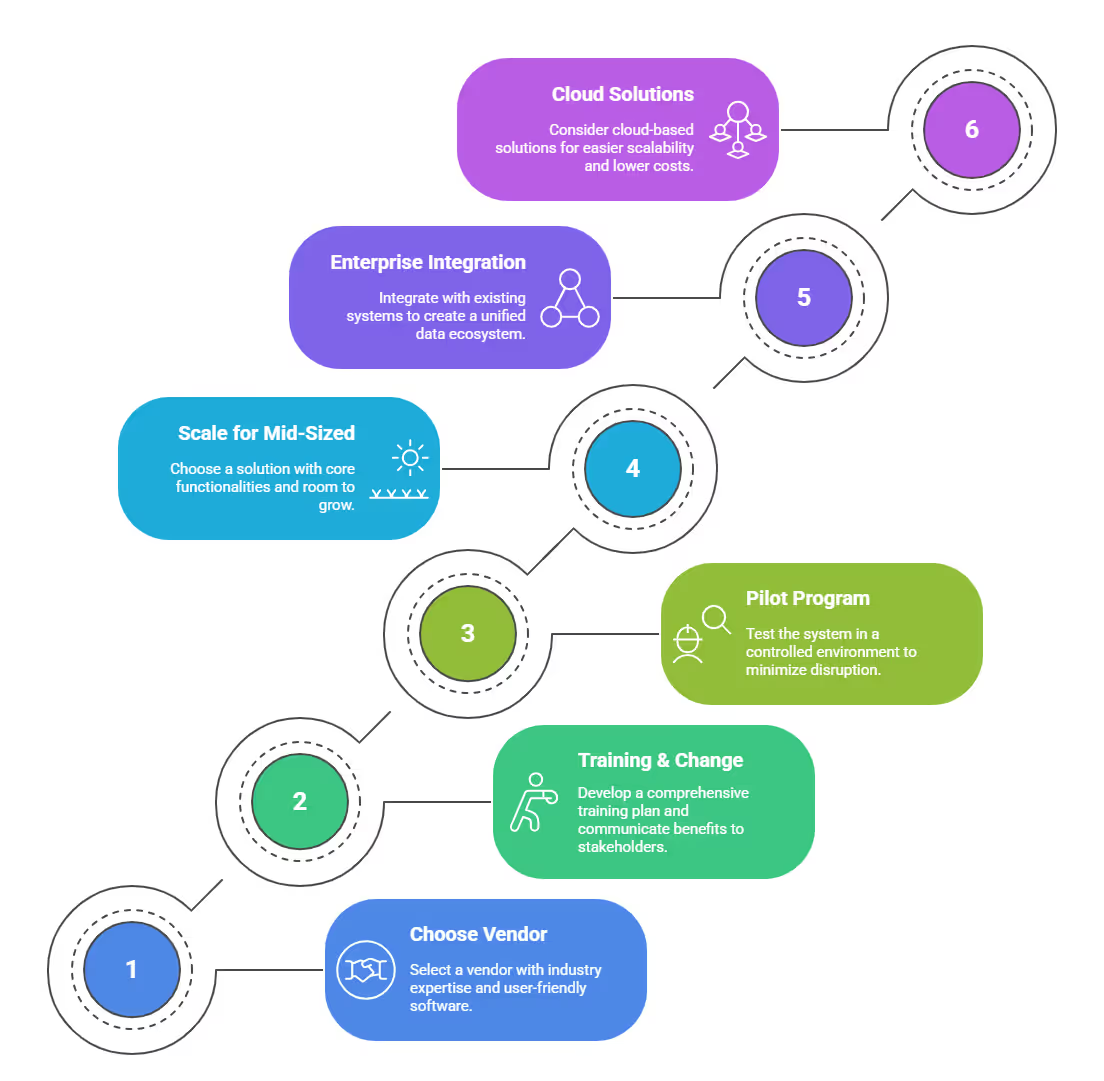
To ensure a successful implementation, it's essential to follow best practices that address vendor selection, personnel training, and scalability for different business sizes.
Choosing the Right Vendor
- Assess a vendor's industry expertise and proven track record. Look for a partner with experience in your specific industry, as they will better understand your unique challenges and compliance requirements. It's not just about the software, but also the support and knowledge they bring.
- Evaluate the software's features and customization options. The best SFC systems offer features like real-time data collection, quality management, and machine integration. Ensure the software can be tailored to your factory's specific workflows without extensive custom coding.
- Prioritize user-friendliness and ongoing support. The interface should be intuitive for factory workers, reducing the learning curve. Additionally, verify the vendor provides comprehensive training and accessible technical support to resolve issues promptly.
Training and Change Management
- Develop a comprehensive training plan for all users. This should include hands-on training for operators and supervisors. Effective training ensures that everyone understands how to use the new system and its benefits.
- Communicate the benefits of the new system to all stakeholders. Clearly explain how the SFC software will improve their work lives, from reduced paperwork to better-informed decision-making. This helps overcome resistance to change.
- Start with a pilot program in a single area or line. This allows you to test the system in a controlled environment and make adjustments before a full-scale rollout, minimizing disruption to overall production.
Scaling for U.S. Factories
- For mid-sized U.S. factories, choose a solution with core functionalities and room to grow. These businesses often need a system that addresses immediate needs like production tracking and quality control, but can later integrate with other systems as the company expands.
- Large U.S. factories should look for enterprise-level solutions with robust integration capabilities. The software must be able to connect with existing ERP, MES, and supply chain management systems to create a unified data ecosystem across multiple plants.
- Consider cloud-based solutions for easier scalability and lower upfront costs. Cloud-based SFC software allows both large and small factories to scale their usage up or down easily without significant hardware investment, making it a flexible and cost-effective option for long-term growth.
The Future of Shop Floor Control in U.S. Manufacturing
The future of shop floor control in U.S. manufacturing is being shaped by Industry 4.0, a new industrial revolution. This movement is digitizing and connecting the factory floor using advanced technologies. These changes are moving manufacturers from a reactive to a proactive approach.
- AI and IoT: The Internet of Things (IoT) connects machines and sensors across the factory, generating vast amounts of data. Artificial Intelligence (AI) analyzes this data to provide valuable insights. AI-powered systems can learn from past data to identify patterns and anomalies, helping to optimize production schedules and pinpoint quality issues before they become major problems.
- Predictive Maintenance: Instead of waiting for a machine to break down, predictive maintenance uses AI to forecast when equipment might fail. By analyzing data from IoT sensors on temperature, vibration, and performance, the software can schedule maintenance exactly when it's needed. This reduces unplanned downtime and extends the life of costly equipment.
- Industry 4.0 Integration: The full realization of Industry 4.0 means that shop floor control systems will no longer be standalone tools. They will be deeply integrated with other business systems, from Enterprise Resource Planning (ERP) to supply chain management. This creates a cohesive, "smart factory" where data flows seamlessly, enabling automated workflows and better decision-making from top to bottom.
Your Path to a Smarter Factory
Shop floor solutions powered by IoT are transforming factories into hubs of efficiency, quality, and innovation. By addressing challenges with tools like predictive maintenance, real-time monitoring, digital twins, and asset tracking, enterprises can save costs, improve products, and stay competitive.
From reducing machine downtime to optimizing supply chain optimization, shop floor automation software delivers measurable results for a smart shop floor.
Ready to build your smart shop floor?
Start by exploring IoT use cases, reviewing resources like Precedence Research’s Industry 4.0 analysis, or consulting an IoT expert to create a tailored shop floor solution.
The future of manufacturing is digital, take the first step today!